Ask Claude to make a Windows, Linux or macOS virtual machine, use it, test your app in it and roll it back. utm-mcp connects Claude Code, Claude Desktop and other AI apps to UTM on your Mac.
For Mac · macOS 14 or later · Needs UTM 5.0.9 or later · An MCP server · Installs with Homebrew · Open source
What it does
A spare PC for Claude
Some things only show up on a real Windows, Linux or Mac machine. utm-mcp gives Claude one to use, in UTM on your Mac, and you can watch everything it does in UTM's window.
01
Make a VM
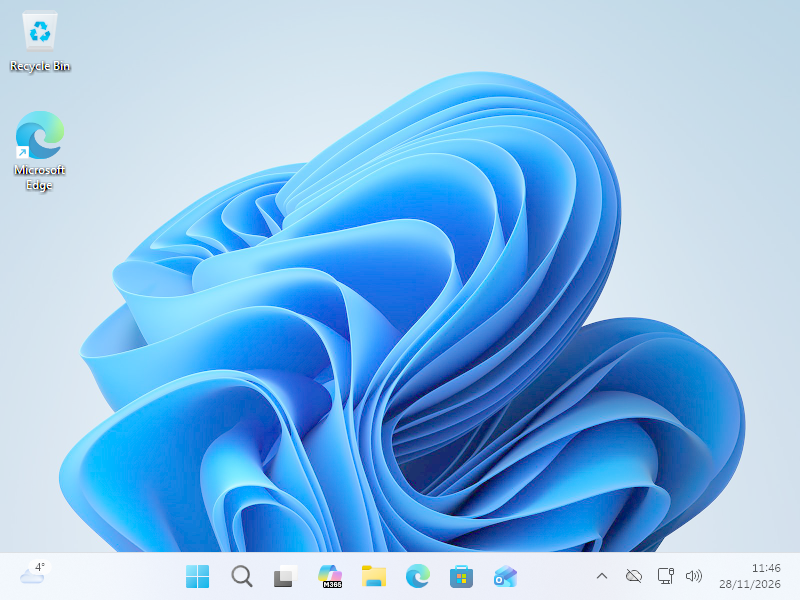
Give Claude a Windows 11 ISO and it makes a VM that installs itself in 15 to 30 minutes, with every setup screen skipped. Ubuntu, Debian and Fedora VMs are ready in under a minute. macOS comes straight from Apple and sets itself up in about 15 minutes.
Windows 11 Dev
02
See and use it
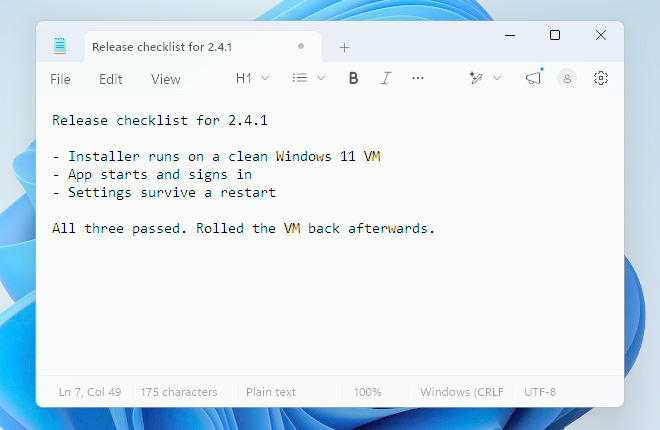
Claude takes screenshots, reads the text on the screen, and types, presses keys and clicks, like you would. It works with any app in the VM, including installers and games.
Windows 11 Dev
03
Try it, then roll back
In a sandbox, Claude can install your app, run it and try anything, then put the VM back exactly as it was. Logs and results come back to your Mac first. Lockdown mode cuts the VM off from the internet and your Mac for software you don't trust.
In a sandbox on my Windows VM, install this build of my app, check it starts, bring me its log, then roll back.
start_sandbox Windows 11 Devinstall_app MyApp-2.4.1.msilaunch_app MyAppscreenshot Windows 11 Devend_sandbox collect app.log
It installed and started with no errors. The log is on your Mac, and the VM is back to how it was.
04
Find out why
When something crashes, Claude gathers what the VM knows, such as crash dumps, event logs, blue screens, graphics driver details and macOS crash reports, into a folder on your Mac, and reads them for you.
My game crashed in the VM. Find out why.
collect_diagnostics Windows 11 Devread_guest_file the crash report
Windows logged the game crashing in its renderer just after the graphics driver reset. The crash dump and event log are in a folder on your Mac.
And everything else
38 tools
Everything Claude needs to look after a VM, from starting it to sharing files with it.
Commands and files
Run commands in the guest, read and write its files, and copy files to and from your Mac.
Silent installs
Apps install with no windows to click through: in Windows from .msi, .msix and most .exe installers, in macOS from .pkg, .dmg, .zip or .app. You get a plain report of what happened.
Snapshots and clones
Save a VM's state and go back to it, or copy a VM. On a Mac-formatted drive a copy is instant and takes almost no space.
Shared folders
Share a folder between a Windows or macOS VM and your Mac, so big files move at disk speed and show up in Finder.
Any MCP app
Works with Claude Code and Claude Desktop, and any other app that speaks MCP, such as Cursor or VS Code.
One small binary
Native Swift, signed and notarized by Apple. It drives UTM, so UTM is still the app you see and use.
Safe by default
Your Mac stays yours
Hands off your Mac
Private files such as keychains, saved passwords, browser data and app settings are never read or written, and nothing that could run code is ever written to your Mac. Files from a VM are quarantined like downloads.
You set the limits
Make it look-only, protect the VMs that matter, limit it to some VMs or tools, or keep Mac files in one folder. Claude can't change these. Every action is logged on your Mac.
No tracking
No analytics and no account. It only goes online to download the Linux and macOS images you ask for. What a tool returns goes to your AI app, like anything else in the chat.
Install
utm-mcp is free. It installs with Homebrew, a free and widely used tool for installing Mac software and keeping it up to date. You'll also need UTM, the free app that runs the virtual machines.
Get Homebrew. Download the installer, open it and click through, like any Mac installer. It asks for your Mac password. Already have Homebrew? Skip to step 2.
Open Terminal, an app that comes with every Mac. Press ⌘Space, type Terminal and press Return.
Click Copy, paste into Terminal with ⌘V and press Return. This installs utm-mcp and adds it to Claude Code.
Install utm-mcp
$ brew tap RossNicholson/tap$ brew trust --formula rossnicholson/tap/utm-mcp$ brew install rossnicholson/tap/utm-mcp$ claude mcp add --scope user utm -- "$(brew --prefix)/bin/utm-mcp"
No UTM yet? Install it the same way with brew install --cask utm.
Start a new Claude Code session and ask it to list your VMs. The first time, your Mac asks whether Terminal may control UTM. Click Allow.
Using Claude Desktop?
Download the .mcpb file from the latest release and open it. Claude Desktop installs it, and its settings page has the main options. utm-mcp is also listed in the official MCP registry, and any other MCP app can point at the installed utm-mcp.
On an older Homebrew, an error about brew trust is safe to ignore.
Give Claude a spare PC
utm-mcp is free, open source, and signed and notarized by Apple.
Also from me: KeyBar, API keys for Claude Code in your Keychain, and ClawdBar, your Claude usage in the menu bar
utm-mcp is an independent project and isn't affiliated with or endorsed by UTM, Anthropic, Microsoft, Apple or Homebrew. Claude and Claude Code are trademarks of Anthropic. Windows is a trademark of Microsoft. macOS is a trademark of Apple.